A Deep Dive into Computer Vision: Mastering Bounding Boxes, Polygons, and Semantic Segmentation with Scematics

Share
  • In the fast-evolving world of AI and machine learning, data annotation is the bedrock upon which models are trained to “see” and “understand” the world. Without accurate, high-quality labeled data, even the most advanced algorithms fail to deliver meaningful results. Among the most popular image annotation techniques are bounding boxes, polygons, and segmentation each serving distinct purposes and offering unique advantages. In this guide, we’ll explore these annotation types, their best uses, and how scematics.io provides powerful, scalable tools for each
  • What Is Data Annotation?

  • Data annotation is the process of labeling data images, text, audio, or video so that machines can learn from it. In computer vision, this typically means marking objects of interest within images or video frames. The quality and granularity of these annotations directly impact model performance, making the choice of annotation method a critical decision in any AI project.
  • Why Data Annotation Matters

  • Feeds Supervised Learning: Annotated data is the “ground truth” that teaches models what to recognize, classify, or segment.
  • Enables Validation: After deployment, annotated data is used to test and validate model accuracy.
  • Reduces Bias: Well-annotated, diverse datasets help prevent models from learning incorrect or biased patterns.
  • Accelerates AI Deployment: High-quality annotations speed up model training and improve real-world performance.
  • Without annotation, AI models would have no reference to learn from resulting in unreliable, unpredictable, and often unusable oututs.
  • Common Types of Image Annotation

    Bounding Boxes

  • Bounding boxes are rectangular frames drawn around objects in an image. They specify the location and approximate size of an object and are widely used for object detection tasks such as identifying cars in traffic, products on shelves, or tumors in medical scans.
  • A Deep Dive into Computer Vision: Mastering Bounding Boxes, Polygons, and Semantic Segmentation with Scematics

    Best Practices for Bounding Box Annotation:

  • Pixel-perfect tightness: Ensure the box edges touch the outermost pixels of the object, minimizing background inclusion.
  • Consistent sizing: Maintain uniform box sizes for similar objects to avoid confusing the model.
  • Avoid overlap: Reduce overlapping boxes, especially in crowded scenes.
  • Rotatable boxes: For tilted objects, use rotatable boxes to better capture orientation.
  • Advantages:

  • Fast to annotate, making them ideal for large datasets.
  • Simple for humans and models to understand.
  • Widely supported by annotation tools and ML frameworks.
  • Limitations:

  • Imprecise for irregular shapes boxes often include irrelevant background.
  • Less effective for overlapping or occluded objects.
  • Not suitable for pixel-level tasks like segmentation.
  • Example Use Cases: Autonomous vehicles (detecting cars, pedestrians), retail (product detection), medical imaging (locating abnormalities).
  • Polygon Annotation

  • Polygon annotation involves drawing multi-sided shapes (polygons) around objects by connecting points along their edges. This method captures the exact contours of objects, offering far greater precision than bounding boxes especially for irregular, non-rectangular, or overlapping objects
  • A Deep Dive into Computer Vision: Mastering Bounding Boxes, Polygons, and Semantic Segmentation with Scematics

    How Polygon Annotation Works:

  • Annotators place vertices at key points along the object’s boundary, creating a closed shape that tightly fits the object. This is particularly useful for objects like trees, animals, or anatomical structures, where a rectangle would include significant irrelevant area.
  • Advantages:

  • High precision: Captures complex shapes and fine details.
  • Reduces noise: Excludes background pixels, improving the signal-to-noise ratio in training data.
  • Versatile: Suitable for any object shape, from simple signs to organic forms.
  • Improved model performance: Leads to better accuracy in instance segmentation and object detection tasks.
  • Limitations:

  • More time-consuming than bounding boxes.
  • Requires skilled annotators for consistent results.
  • Higher computational cost during model training.
  • Example Use Cases: Agriculture (crop monitoring), medical imaging (tumor segmentation), aerial mapping (land use classification).
  • Segmentation

  • Segmentation takes annotation to the pixel level. Instead of marking whole objects, every pixel in an image is assigned a class label. There are two main types:
  • Semantic Segmentation: Classifies each pixel into a category (e.g., “road,” “sky,” “pedestrian”), useful for scene understanding.
  • Instance Segmentation: Distinguishes between individual objects of the same class (e.g., two different cars), providing both category and instance information.
  • A Deep Dive into Computer Vision: Mastering Bounding Boxes, Polygons, and Semantic Segmentation with Scematics

    Advantages:

  • Unmatched detail: Enables models to understand scenes at the pixel level.
  • Critical for high-precision applications like medical diagnosis, robotics, and autonomous systems.
  • Enables advanced analytics such as object counting, area measurement, and boundary analysis.
  • Limitations:

  • Extremely labor-intensive requires significant annotation effort.
  • Computationally expensive to train and infer.
  • Challenging to scale for large datasets.
  • Example Use Cases: Medical imaging (identifying tissue types), autonomous driving (understanding road scenes), urban planning (land cover mapping).
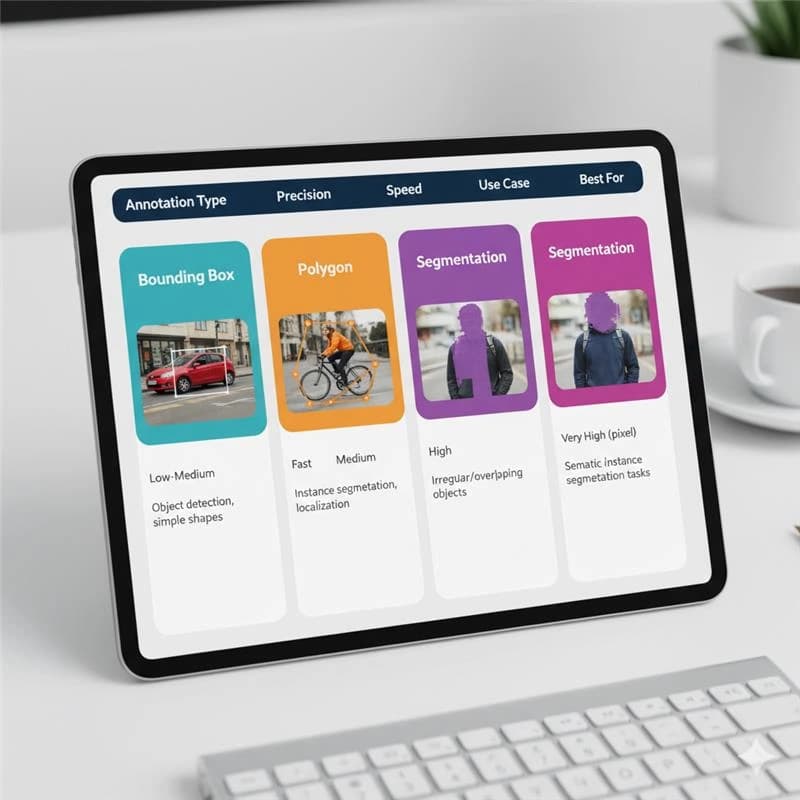
  • Comparing Annotation Types

    A Deep Dive into Computer Vision: Mastering Bounding Boxes, Polygons, and Semantic Segmentation with Scematics

    Choosing the right method depends on your project’s needs:

  • Need speed and simplicity? Use bounding boxes.
  • Dealing with complex shapes? Choose polygons.
  • Require pixel-level accuracy? Opt for segmentation.
  • How Scematics Empowers Your Annotation Workflow

  • Scematics is a modern, AI-powered annotation platform designed to handle all the annotation types discussed above bounding boxes, polygons, and segmentation with efficiency, precision, and scalability. Here’s how it stands out:
  • Comprehensive Annotation Tools

  • Bounding Boxes, Polygons, Segmentation: All major annotation types are supported out of the box, with intuitive interfaces for each.
  • AI-Assisted Labeling: Leverage AI to generate initial annotations, which human annotators can review and refine reducing labeling time by up to 80%.
  • Customizable Workflows: Tailor the annotation process to your project’s needs, ensuring consistency and quality.
  • Collaboration and Quality Control

  • Real-Time Collaboration: Multiple annotators and reviewers can work together, with threaded feedback and status tracking for every annotation.
  • Quality Metrics: Detailed analytics dashboards track annotation accuracy, team performance, and dataset trends, helping you identify and resolve issues quickly.
  • Expert Annotators: Access in-house annotators with deep domain expertise (e.g., CGI, computer vision) for challenging or specialized tasks.
  • Integration and Scalability

  • Seamless Integration: Robust SDKs and APIs allow Scematics to fit into your existing MLOps and data pipelines, supporting AWS, GCP, Azure, and on-premise storage.
  • Scalable Infrastructure: Handle datasets of any size, from small pilot projects to enterprise-scale deployments.
  • Synthetic Data: Generate hyper-realistic, fully labeled synthetic datasets to fill gaps, protect privacy, and accelerate model training.
  • Use Case Examples with scematics.io

  • Autonomous Vehicles (Link: Autonomous Vehicle Training: Annotation Standards for Self-Driving Cars with Scematics): Use bounding boxes for vehicle/pedestrian detection, polygons for irregular obstacles, and segmentation for scene understanding all within a single platform.
  • Healthcare (Link: Medical AI: Annotation Requirements for Healthcare Computer Vision through Scematics): Annotate medical images with pixel-level precision for diagnosis, leveraging Scematics’s quality controls and expert annotators
  • Retail and E-Commerce (Link: Retail AI: Product Recognition and Inventory Management with Scematics): Quickly label products with bounding boxes for inventory management or use polygons for fashion item segmentation.
  • Agriculture (Link: Agricultural AI: Precision Farming Through Computer Vision with Scematics): Map crops and fields with polygon and segmentation tools, enabling precision agriculture applications.
  • Best Practices for Effective Data Annotation

  • To maximize the value of your annotated datasets no matter which tool or annotation type you choose follow these proven best practices:
  • Define Clear Objectives

  • Specify the task (e.g., object detection, instance segmentation).
  • Develop detailed annotation guidelines to ensure consistency across annotators.
  • Choose the Right Tool

  • Select a platform (like Scematics) that supports your required annotation types, offers collaboration features (Link: The Cloud-Based Data Labeling Revolution: How Collaborative Annotation is Transforming Enterprise AI at Scale), and integrates with your workflow.
  • Ensure scalability to handle growing datasets and diverse annotation needs.
  • Train and Support Annotators

  • Provide comprehensive training on both the annotation task and the tool.
  • Offer ongoing support and quality feedback to maintain high standards.
  • Implement Rigorous Quality Control

  • Use multi-tier review (annotator → reviewer → expert) to catch errors.
  • Leverage analytics to monitor performance and identify areas for improvement.
  • Iterate and Improve

  • Continuously refine guidelines based on model performance and annotator feedback.
  • Update datasets as edge cases and new scenarios are discovered.
  • Advanced Techniques and Hybrid Approaches

  • In practice, many projects benefit from hybrid annotation strategies. For example:
  • Bounding Boxes + Polygons: Use bounding boxes for most objects and polygons for those with irregular shapes.
  • Polygons + Segmentation: Start with polygons for instance-level annotation, then add semantic segmentation for pixel-level understanding when needed.
  • AI-Assisted + Human Review: Let AI suggest annotations for efficiency, then have humans refine for accuracy.
  • Scematics supports all these workflows, making it easy to mix and match annotation types as your project evolves.
  • Converting Between Annotation Formats

  • Sometimes, you may need to convert between annotation formats for instance, turning polygon annotations into bounding boxes for object detection training, or masks into polygons for finer control. Tools and scripts (e.g., using the Supervision library) can automate these conversions, and platforms like scematics.io are designed to handle such transformations seamlessly within your pipeline.
  • The Future of Data Annotation

  • As AI models grow more sophisticated, the demand for high-quality, diverse, and precisely annotated data will only increase. Platforms like Scematics are at the forefront, combining human expertise with AI-powered automation to deliver datasets that fuel the next generation of AI applications.
  • Whether you’re annotating with bounding boxes, polygons, or segmentation masks, the key is to match the annotation type to your use case, leverage the right tools, and maintain rigorous quality standards throughout the process.
  • Scematics Copyrights Reserved

    Post comments

    Comments