Bounding Boxes vs Polygons vs Segmentation: Which Annotation Type Is Right for Your Project?

Share
  • One of the first decisions on any computer vision project is also one of the most consequential: which annotation type should your team use? Get it right and your model trains on data that gives it exactly what it needs to learn. Get it wrong and you spend weeks relabeling a dataset that was never going to work.
  • Quick Answer: Which Annotation Type Should You Use?
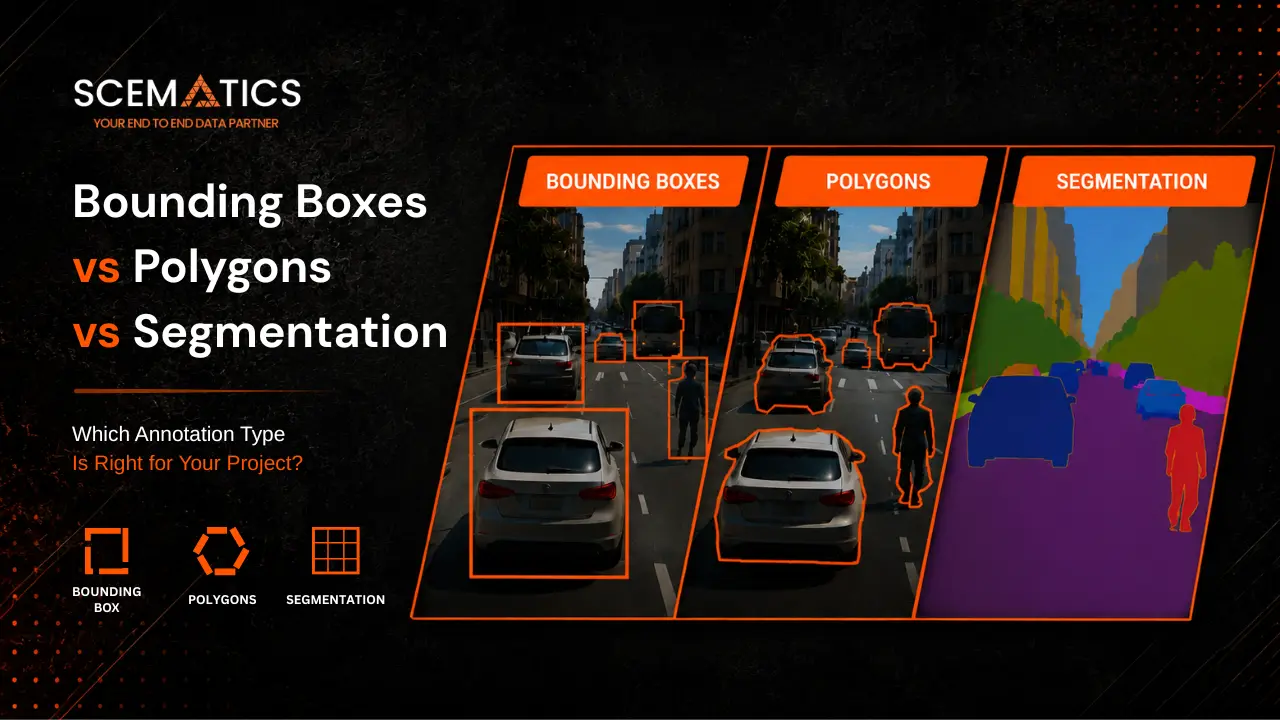
    Bounding Boxes vs Polygons vs Segmentation: Which Annotation Type Is Right for Your Project?

    The right annotation type depends on what your model needs to know about the objects in your images. Use bounding boxes when your model needs to locate and classify objects and shape precision is not required. Use polygon annotation when object boundaries matter but pixel-level accuracy is not needed. Use segmentation when your model needs to understand exact object shapes at pixel level.

  • Bounding Box: object location and class only, fastest annotation, lowest cost, widest model compatibility
  • Polygon Annotation: object boundary and class, moderately slower, higher precision than boxes, used for irregular shapes
  • Semantic Segmentation: every pixel classified, slowest annotation, highest cost, required for scene-level understanding
  • Instance Segmentation: every pixel classified with individual object identity, required when counting or separating objects of the same class
  • What Each Annotation Type Encodes

    Before comparing annotation types, it helps to understand what each one actually tells your model. Annotation is not just a drawing exercise. Each format encodes a different type of spatial information, and that information shapes what the model can and cannot learn.

    Bounding Box Annotation

    A bounding box is a rectangle defined by two corner points or by a center point plus width and height. It tells the model that an object of a certain class exists at a certain location within a rectangular region.What the model learns: the object exists, its approximate location, its class. What the model does not learn: the object exact shape, which pixels belong to the object versus the background within the box.

  • Encodes: object class, x and y coordinates, width, height
  • Does not encode: object shape, pixel-level membership, object boundary
  • Standard formats: YOLO TXT (normalized coordinates), PASCAL VOC XML, COCO JSON, CSV
  • Example task: detecting products on a retail shelf, locating faces in security footage, finding vehicles in traffic camera feeds
  • Polygon Annotation

    Polygon annotation traces the actual outline of an object using a series of connected anchor points. The result is a closed shape that follows the object real contour rather than approximating it with a rectangle. A polygon can have as few as 3 anchor points for a triangular object or 50 or more for complex irregular shapes.What the model learns: the object class and its precise boundary. What the model does not learn: which interior pixels belong to the object without additional processing, though polygons can be converted to segmentation masks.

  • Encodes: object class, ordered sequence of x and y coordinates forming a closed boundary
  • Does not encode: interior pixel membership directly (though convertible to mask)
  • Standard formats: COCO JSON polygon, YOLO-seg TXT (normalized coordinates)
  • Example tasks: annotating crop disease regions in agricultural imagery, labeling rooftops in aerial photography, outlining anatomical structures in medical scans
  • Semantic Segmentation

    Semantic segmentation assigns a class label to every single pixel in an image. A pixel can only belong to one class. All objects of the same class share the same label regardless of whether they are physically separate objects. Two adjacent cars are both labeled car with no distinction between them.What the model learns: a dense understanding of what every part of the scene is. What the model does not learn: which instance of a class individual pixels belong to.

  • Encodes: class label for every pixel in the image
  • Does not encode: individual object identity within a class
  • Standard formats: COCO segmentation JSON, Mask PNG (color-coded per class)
  • Example tasks: land cover classification in satellite imagery, road scene parsing for autonomous navigation, tissue type classification in pathology slides
  • Instance Segmentation

    Instance segmentation combines object detection and segmentation: it identifies each individual object and assigns a unique pixel-level mask to each one. Two cars in the same frame are labeled as separate instances with separate masks, not as a single car region.

    What the model learns: what every pixel is, which specific object each pixel belongs to, and how many individual objects of each class are in the scene.

  • Encodes: class label and unique instance identity for every pixel
  • Standard formats: COCO JSON with polygon or RLE mask encoding
  • Example tasks: counting individual cells in biomedical imaging, separating overlapping objects in bin-picking robotics, tracking individual pedestrians in crowd footage
  • Bounding Box Annotation: Fast, Flexible, and Widely Supported
    Bounding Boxes vs Polygons vs Segmentation: Which Annotation Type Is Right for Your Project?

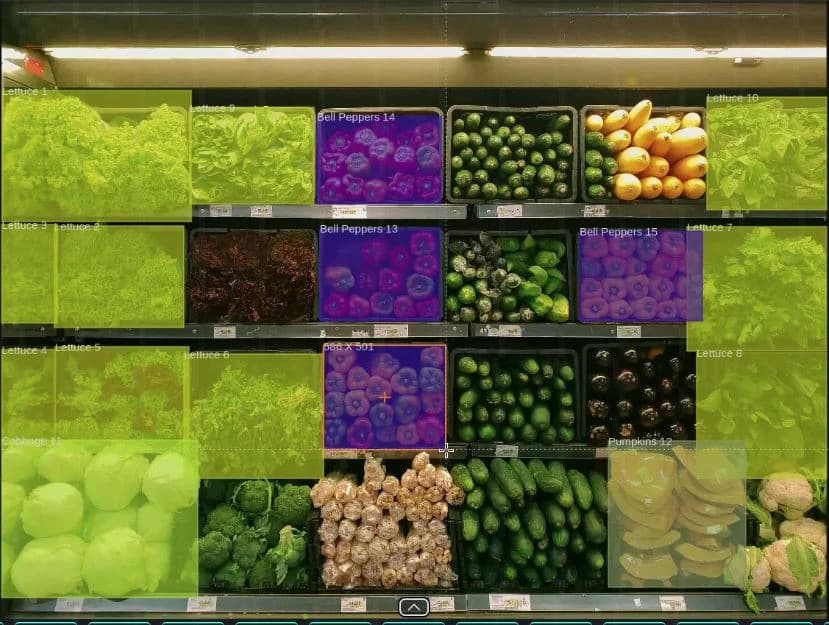
    A bounding box is the most widely used annotation type in computer vision. It is the default format for object detection and the starting point for most production labeling pipelines.

    When to Use Bounding Box Annotation

  • Object detection is the goal and you do not need shape information beyond the bounding region
  • Objects are roughly rectangular or compact in shape, minimizing background noise within the box
  • Dataset volume is large and annotation budget is constrained
  • The target model architecture is YOLO, Faster R-CNN, SSD, RetinaNet, or EfficientDet
  • Speed of annotation is a priority over spatial precision
  • Real-World Use Cases for Bounding Box Annotation

  • Retail product detection: detecting and classifying products on shelves for inventory management and planogram compliance
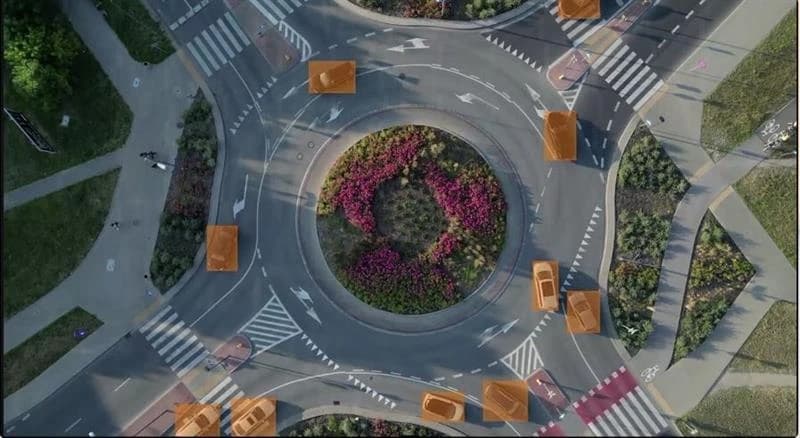
  • Vehicle detection and counting: locating cars, trucks, and motorcycles in traffic camera feeds and parking lot monitoring systems
  • Face detection: locating faces in images for downstream recognition, emotion analysis, or access control
  • Package detection in logistics: tracking parcels on conveyor belts, identifying damaged packaging in warehouse sorting lines
  • Wildlife monitoring: detecting animals in camera trap footage for population counting and behavior analysis
  • Limitations of Bounding Box Annotation

  • Background noise: a rectangle always includes some background pixels within its boundary, which can harm model accuracy for objects with highly irregular shapes
  • Overlap problems: when two objects overlap significantly, bounding boxes overlap and it becomes difficult for the model to separate detections
  • No shape information: models trained on bounding box data cannot understand the outline or silhouette of objects, limiting downstream tasks like shape-based filtering or robot grasping
  • Polygon Annotation: Better Precision, Proportional Effort

    Polygon annotation traces the actual outline of an object using anchor points. It sits between bounding boxes and full segmentation in terms of both precision and cost, making it the practical choice for a wide range of production use cases.

    When to Use Polygon Annotation

  • Objects have irregular boundaries that would result in significant background noise if annotated with bounding boxes
  • The model needs to understand object shape for downstream tasks such as area calculation, shape classification, or contour analysis
  • The use case involves domains where boundary precision directly affects accuracy: autonomous vehicles, medical imaging, aerial analysis, or manufacturing quality control
  • Budget allows for moderate annotation cost increase over bounding boxes, with AI-assisted tools used to reduce per-object time
  • Real-World Use Cases for Polygon Annotation

  • Autonomous driving: pedestrians, cyclists, and vehicles have irregular shapes that extend beyond their bounding box; polygon outlines give the model the information needed for safety-critical navigation decisions
  • Rooftop detection in aerial imagery: building footprints are irregular polygons; rectangle approximations introduce large errors in area and overlap calculations
  • Medical imaging: anatomical structures such as tumors, lesions, and organs have complex shapes that require precise boundary annotation for diagnostic model accuracy
  • Agricultural field analysis: individual crop plants, disease regions, and irrigation boundaries require polygon outlines to support precision farming analytics
  • Manufacturing quality control: component outlines and defect regions on irregular parts are better captured by polygon annotation than bounding boxes
  • Polygon Annotation Cost and Speed

  • Polygon annotation takes 3 to 10 times longer than bounding box annotation per object, depending on shape complexity
  • Simple polygons with 5 to 10 anchor points can be produced nearly as quickly as bounding boxes by experienced annotators
  • Complex objects with 30 to 50 anchor points take significantly longer and benefit most from AI-assisted pre-annotation
  • AI-assisted polygon suggestion tools such as Scematics SAM 3 integration generate an initial polygon outline that annotators review and correct, reducing time cost by up to 70 percent for common object types
  • Segmentation Annotation: Pixel-Level Detail for Demanding Applications
    Bounding Boxes vs Polygons vs Segmentation: Which Annotation Type Is Right for Your Project?

    Segmentation annotation assigns a label to every pixel in an image. It is the highest-precision annotation format available and also the most time-intensive to produce. It belongs on projects where pixel-level accuracy directly affects the application outcome.

    When to Use Semantic Segmentation

  • The model needs to understand what every part of the scene is, not just where specific objects are located
  • The application involves scene parsing, land cover classification, or road scene understanding
  • The target model architecture is U-Net, DeepLab, FCN, SegFormer, or similar fully convolutional architectures
  • Pixel-level output is required for downstream computation such as area measurement, boundary analysis, or spatial planning
  • When to Use Instance Segmentation

  • The model needs to count, track, or distinguish individual objects of the same class within a scene
  • The application involves bin-picking robotics, cell counting in biomedical imaging, or crowd analysis
  • The target model architecture is Mask R-CNN, YOLOv8-seg, YOLO11-seg, SOLOv2, or similar instance-aware architectures
  • Real-World Use Cases for Segmentation Annotation

  • Diagnostic medical imaging: tissue boundary delineation in pathology slides, organ segmentation in MRI scans, lesion boundary mapping where clinical measurements depend on pixel-accurate outlines
  • Full autonomous driving perception stacks: semantic segmentation of road, sidewalk, sky, and object classes for comprehensive scene understanding beyond what object detection provides
  • Satellite imagery analysis: land use and land cover classification where every pixel needs to be classified as water, vegetation, urban area, or bare soil
  • Robotic manipulation: grasping robots need the exact contour of an object to plan approach trajectories and grip positions
  • Augmented reality: separating foreground subjects from backgrounds at pixel level for compositing and mixed reality applications
  • Annotation Types Comparison: At a Glance

    The comparison table below covers the key decision dimensions for bounding box, polygon, and segmentation annotation. Use it to map annotation type requirements directly to your project constraints.

    CriteriaBounding BoxPolygonSemantic SegmentationInstance Segmentation
    Annotation SpeedFastest (100s per hour)3x to 10x slower than bounding boxSlowest (pixel-level work)Slowest (pixel-level per instance)
    Spatial PrecisionLow (includes background noise)High (traces object boundary)Highest (pixel level)Highest (pixel level per instance)
    Annotation CostLowestModerateHighHighest
    Model ArchitecturesYOLO, Faster R-CNN, SSD, EfficientDetMask R-CNN, YOLOv8-segU-Net, DeepLab, FCN, SegFormerMask R-CNN, YOLOv8-seg, SOLOv2
    Primary Use CasesRetail, security, logistics, trafficAutonomous vehicles, medical imaging, aerialScene understanding, satellite, roboticsCell counting, bin-picking, crowd tracking
    Export FormatsYOLO TXT, PASCAL VOC, COCO JSON, CSVCOCO JSON, YOLO-seg TXTCOCO segmentation, Mask PNGCOCO JSON (polygon or RLE)
    Object Overlap HandlingPoor (boxes overlap)Good (outlines separate cleanly)Excellent (per-pixel class)Excellent (per-pixel per instance)
    AI-Assist AvailableYes (auto-detection)Yes (SAM 3 outline suggestion)Yes (mask generation)Yes (SAM 3 instance masking)

    How to Choose the Right Annotation Type: A Decision Framework

    Choosing an annotation type is a resource allocation decision. The right format is not always the most precise one. It is the one that gives your model what it actually needs to perform the task at the lowest sustainable cost per labelled image.

    Question 1: What Does Your Model Need to Know?

  • Location only (does the object exist and where is it roughly?): bounding box annotation is sufficient and optimal
  • Location and shape (does the object exist, where is it, and what is its exact outline?): polygon annotation is the right format
  • Scene-level understanding (what is every part of this image?): semantic segmentation is required
  • Individual object identity at pixel level (which specific object does each pixel belong to?): instance segmentation is required
  • Question 2: What Is the Geometry of Your Objects?

  • Roughly rectangular and compact (cars from above, product packages, license plates): bounding boxes work well with minimal background noise
  • Irregular but with clear boundaries (vehicles from the side, crops, anatomical structures, building footprints): polygon annotation is the appropriate format
  • Objects that fill or define entire scene regions (road types, vegetation zones, tissue types): segmentation annotation is required
  • Multiple individual objects of the same class that are close together or overlapping (pedestrians in a crowd, cells in a microscopy image): instance segmentation is required
  • Question 3: What Is the Annotation Budget and Volume?

  • Large datasets (50,000 or more images) on standard commercial timelines: bounding boxes are often the only realistic format without significant AI-assisted annotation infrastructure
  • Medium datasets (5,000 to 50,000 images) where shape matters: polygon annotation with AI-assisted pre-annotation keeps costs manageable
  • Smaller high-value datasets (fewer than 5,000 images) where precision is critical: segmentation annotation is viable and the cost per decision is justified by model performance requirements
  • When AI-assisted labeling tools are available: the cost gap between formats narrows significantly. SAM 3 integration can reduce polygon annotation time by up to 70 percent and segmentation annotation time by similar margins
  • Question 4: What Model Architecture Is Your Team Targeting?

  • YOLO (all versions), Faster R-CNN, SSD, RetinaNet, EfficientDet: designed for bounding box input; use bounding box annotation
  • Mask R-CNN, YOLOv8-seg, YOLO11-seg, SOLOv2: designed for instance segmentation input; use polygon or instance segmentation annotation
  • U-Net, DeepLab, FCN, SegFormer, HRNet: designed for semantic segmentation input; use semantic segmentation annotation
  • Custom architectures: check training data requirements in the model documentation before starting annotation
  • Mixing Annotation Types in Production

    Most production computer vision pipelines do not use a single annotation type across the entire dataset. They use different formats for different object classes depending on how much precision each class requires.

    Why Mixing Is a Valid Strategy

  • Not all object classes have equal impact on model performance. Annotating high-impact classes with polygons and lower-impact classes with bounding boxes reduces total annotation cost without sacrificing the precision that actually matters.
  • Some classes have inherently rectangular shapes (shipping boxes, product packages, license plates) while others are irregular (people, vehicles, crops). Matching annotation format to object geometry by class is sensible resource allocation.
  • Annotation budget often runs out on the classes that need the most attention. Reserving polygon and segmentation work for high-complexity, high-impact classes lets teams allocate annotation hours where they create the most value.
  • Practical Examples of Mixed Annotation Pipelines

  • Retail analytics: bounding box annotation for shelf products (rectangular, low shape complexity) combined with polygon annotation for promotional displays and irregular point-of-sale fixtures
  • Autonomous driving: bounding box annotation for traffic signs and signals (compact, rectangular) combined with polygon annotation for vehicles and pedestrians (irregular shapes, safety-critical boundaries)
  • Medical imaging: bounding box annotation for quick localization passes to identify regions of interest, followed by polygon or segmentation annotation on confirmed pathology regions for fine-grained training data
  • Aerial survey: bounding box annotation for compact point targets (vehicles, trees) combined with polygon annotation for extended features (building footprints, field boundaries, road segments)
  • Platform Requirements for Mixed Annotation

  • Not all annotation platforms support all annotation types within the same project. When mixing types, verify that your labeling tool can handle bounding boxes, polygons, and segmentation masks in a single workflow without requiring project switching or format conversion at export time.
  • Scematics supports bounding boxes, polygon annotation, polylines, keypoints, semantic segmentation, and instance segmentation within a single annotation project. Teams can mix formats across object classes without switching platforms, and AI-assisted labeling tools are available across all annotation types.
  • AI-Assisted Annotation: Closing the Speed Gap Between Formats

    The cost difference between bounding box and polygon or segmentation annotation has historically been the primary reason teams choose lower-precision formats. AI-assisted annotation tools are narrowing that gap substantially.

    How AI-Assisted Annotation Works

  • A foundation model such as Meta SAM 3 (Segment Anything Model 3) analyzes an image and generates an initial annotation suggestion: a bounding box detection, a polygon outline, or a full segmentation mask.
  • Human annotators then review the AI-generated suggestion, correct any errors, and approve the final annotation. The annotator shifts from drawing to verifying, which is significantly faster.
  • For polygon annotation, AI-assisted tools reduce per-object annotation time by 50 to 70 percent for common object types, making polygon annotation cost-competitive with manual bounding box annotation in many scenarios.
  • For segmentation annotation, SAM 3-style tools generate dense pixel masks from a single point click or rough bounding box, dramatically reducing the time required to produce high-quality segmentation labels.
  • AI Assistance Across Annotation Types

  • Bounding boxes: auto-detection models can pre-populate bounding boxes for common object classes, with annotators reviewing and correcting rather than drawing from scratch
  • Polygon annotation: SAM 3 integration generates polygon suggestions from a click or drag input; annotators refine anchor points and approve
  • Semantic segmentation: model generates full-image class masks; annotators correct boundary errors and misclassified regions
  • Instance segmentation: SAM 3 generates per-object masks; annotators verify instance identity and correct mask boundaries
  • When AI Assistance Has Limits

  • Highly specialized domains with few public training examples: foundation models trained on general imagery may produce inaccurate suggestions for rare medical structures, unusual manufacturing defects, or novel object categories
  • Dense or heavily occluded scenes: AI assistance performs worse in images where objects overlap significantly or where small objects are close together
  • Quality-critical datasets: even with AI assistance, review rates should be maintained or increased to catch systematic errors in AI-generated labels before they scale across a large dataset
  • Export Formats and Model Compatibility

    The annotation format you use and the export format your labeling platform produces must be compatible with your training framework. Mismatches between annotation format and model architecture are a common source of wasted labeling work.

    Bounding Box Export Formats

  • YOLO TXT: normalized center x, center y, width, height per line. Required for all YOLO model variants in standard detection configuration.
  • PASCAL VOC XML: absolute pixel coordinates in XML. Used for Faster R-CNN and legacy object detection benchmarks.
  • COCO JSON: absolute coordinates with category IDs and image metadata. Used for COCO-pretrained model fine-tuning and multi-class detection evaluation.
  • CSV: flexible format for custom pipeline integration and dataset management tooling.
  • Polygon Annotation Export Formats

  • COCO JSON polygon: list of x, y coordinate pairs per object annotation. The standard format for instance-level polygon data.
  • YOLO-seg TXT: normalized polygon coordinates per line. Required for YOLOv5-seg, YOLOv8-seg, and YOLO11-seg in segmentation mode.
  • Polygon data can be rasterized to segmentation masks for use with semantic segmentation model architectures.
  • Segmentation Export Formats

  • COCO segmentation JSON: RLE (Run-Length Encoding) or polygon masks per object instance. The most widely used format for instance segmentation.
  • Mask PNG: color-coded pixel mask where each class or instance has a unique color value. Used for semantic segmentation model training and evaluation.
  • Scematics exports COCO JSON, YOLO TXT, PASCAL VOC, YOLO-seg TXT, CreateML JSON, and Mask PNG across all annotation types from a single platform.
  • Annotation Type Comparison: Frequently Asked Questions

    What is the difference between bounding box and polygon annotation?

  • A bounding box is a rectangle drawn around an object that captures its approximate location. Polygon annotation traces the actual outline of an object using a series of connected anchor points, producing a shape that closely follows the object real contour. Polygon annotation is more precise but takes 3 to 10 times longer to produce than a bounding box of the same object.
  • When should I use bounding box annotation instead of segmentation?

  • Use bounding box annotation when your model only needs to locate and classify objects and does not need information about their exact shape. Bounding boxes are the right choice when objects are compact and roughly rectangular, when annotation budget or timeline is constrained, and when the target model architecture is YOLO, Faster R-CNN, or SSD.
  • How much more expensive is polygon annotation than bounding box?

  • Manual polygon annotation takes 3 to 10 times longer than bounding box annotation depending on object shape complexity. With AI-assisted annotation tools such as SAM 3 integration, polygon annotation time can be reduced by 50 to 70 percent, bringing it much closer to bounding box annotation costs for common object types.
  • Is polygon annotation the same as segmentation?

  • No, polygon annotation and segmentation annotation are different. Polygon annotation produces a vector outline of an object boundary. Segmentation annotation assigns a class label to every individual pixel in the image. Polygon outlines can be converted to segmentation masks (rasterized), but a segmentation mask has more spatial information than a polygon alone and is produced at pixel resolution rather than as a set of boundary coordinates.
  • What annotation type does YOLO use?

  • Standard YOLO object detection models (YOLOv5, YOLOv8, YOLO11 in detection mode) use bounding box annotation in normalized YOLO TXT format. YOLOv5-seg, YOLOv8-seg, and YOLO11-seg use instance segmentation annotation in YOLO-seg TXT format, which contains normalized polygon coordinates.
  • How do I annotate overlapping objects?

  • For overlapping objects, polygon annotation and instance segmentation handle overlap significantly better than bounding boxes. Each object gets its own polygon outline or pixel mask regardless of overlap, so the model receives clear separate labels for each instance. With bounding boxes, overlapping detections require non-maximum suppression (NMS) post-processing, which can merge or drop valid detections.
  • Where can I start annotating with all three formats in one platform?

  • Scematics supports bounding box annotation, polygon annotation, polylines, keypoints, semantic segmentation, and instance segmentation within a single annotation workflow. AI-assisted labeling with SAM 3 is available across all annotation types. A free tier is available to test annotation formats before committing to a production labeling run.
  • Start with the Right Annotation Format

    Scematics gives your team bounding boxes, polygon annotation, polylines, keypoints, semantic segmentation, and instance segmentation within a single annotation platform, with SAM 3 AI assistance available across all types. Both self-serve and managed annotation service options are available for projects of any scale.If you are scoping an annotation project and unsure which format fits your use case, the Scematics team can help you evaluate annotation type options based on your dataset, model architecture, and accuracy requirements.

    Scematics Copyrights Reserved

    Post comments

    Comments